On this page
The words we use#
| Term | Meaning |
|---|---|
| Recommendation | A tour the site or the AI assistant suggests because it fits your trip. |
| Quote request (enquiry) | The form you send to an agency, describing your trip. |
| Quote | The agency's written offer in reply: price, what is included, validity, terms. |
| Booking | An agreement and payment made directly with the agency. It does not happen on Recent Visits. |
Where you can ask for a quote#
You do not need an account to send a request. There are four places:
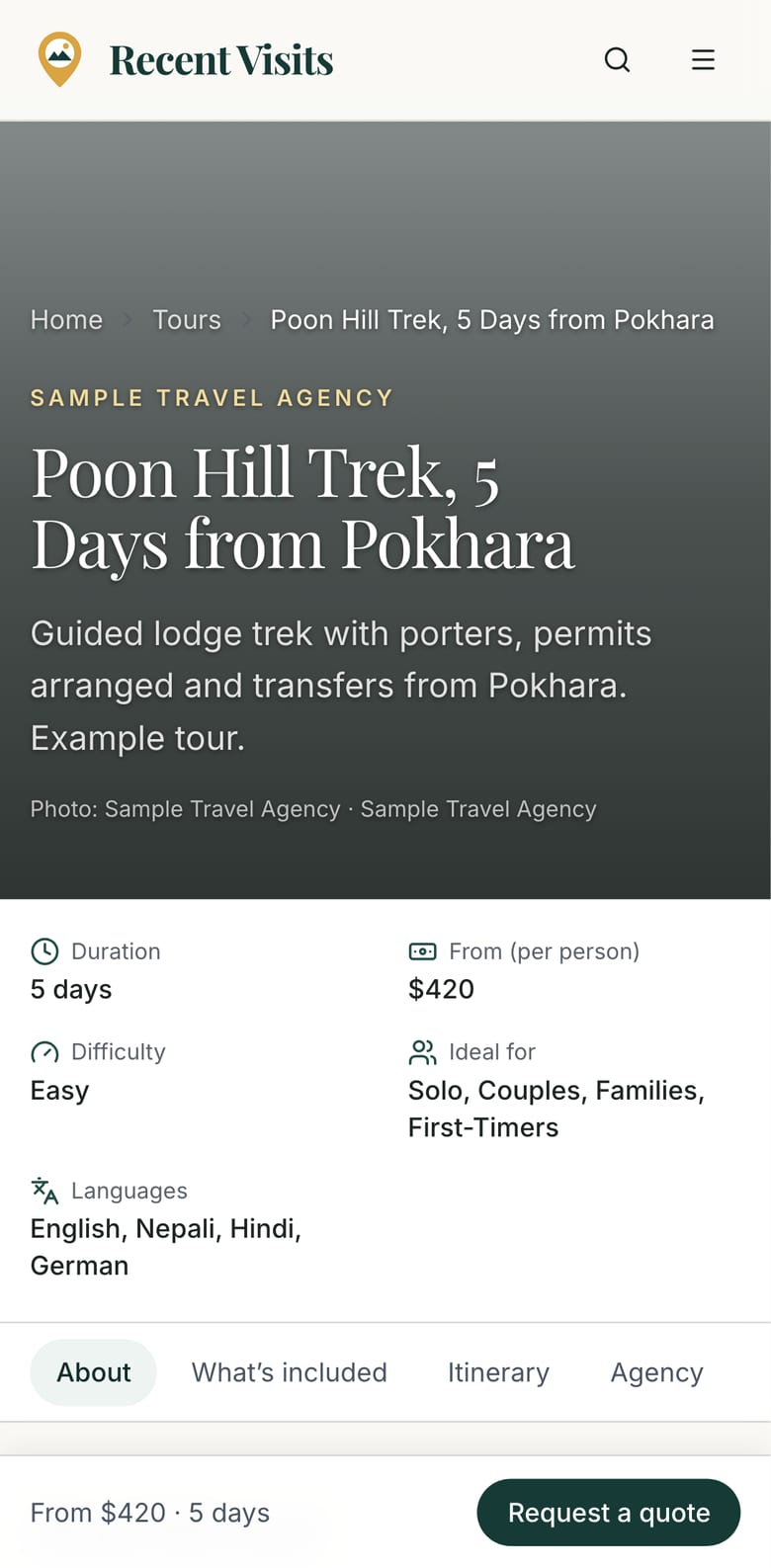
- A tour page, in the Request a quote section. The request goes straight to that agency. (Some tours link to the agency's own website instead, with an Enquire on partner site button, and a View on partner site button may also be shown.)
- An agency page, in the Contact (agency name) form.
- The AI assistant: Request quote on a recommended tour opens a side panel titled Request a quote with the same form, pre-filled from your trip.
- An itinerary page, Request quotes for this itinerary: choose up to three agencies and send the day-by-day plan to all of them at once. See Request quotes for an itinerary.
On phones and tablets a bar fixed to the bottom of a tour or itinerary page (Request a quote or Get quotes) jumps to the form, which can be a long way down the page.
Fill in the form#
This is the form on a tour page, an agency page and in the assistant's side panel.
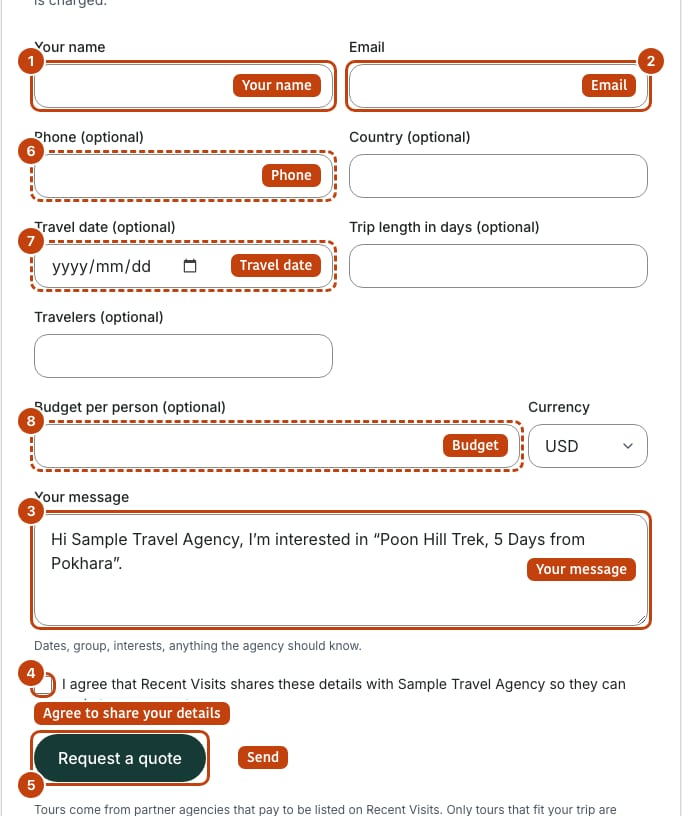
| Field or item | Type | Required? | Explanation | How to use it |
|---|---|---|---|---|
| Your name | Text | Yes | 2 to 120 characters. Error: "Tell the agency who you are". | Type the name the agency should use. |
| Yes | Where the agency's quote and messages are announced. Not shown to the agency until you accept one of its quotes. Error: "Enter a valid email address". | Use an address you read. | ||
| Phone (optional) | Phone | No | Up to 40 characters. Also hidden from the agency until you accept a quote. | Add it only if you want to be called after you accept. |
| Country (optional) | Text | No | Where you live, up to 80 characters. | Optional. |
| Travel date (optional) | Date | No | The date you hope to start. Error: "Use a valid date". | Pick a date from the calendar. |
| Trip length in days (optional) | Number | No | 1 to 120. Pre-filled when the request starts from the assistant. | Enter the number of days. |
| Travelers (optional) | Number | No | 1 to 50. Pre-filled from the assistant. | Enter the group size. |
| Budget per person (optional) | Number | No | 0 to 10,000,000, in the currency chosen next to it. | Enter a number, or leave blank. |
| Currency | Menu | No | USD (default), EUR, GBP, AUD, INR or NPR. In the assistant the trip's own currency is added if it is not in the list. | Choose the currency of your budget. |
| Your message | Text area | Yes | 10 to 3,000 characters. Hint: "Dates, group, interests, anything the agency should know." Error: "Add a few words about your trip". On a tour page it starts with "Hi (agency), I'm interested in "(tour)"."; in the assistant it holds a summary of your trip and the plan so far. | Edit or replace the text. Add dates, group, interests and questions. |
| Consent box | Check box | Yes | "I agree that Recent Visits shares these details with (agency) so they can reply to my request." Error: "Please agree to share your details with the agency". | Tick it to confirm. |
| Request a quote | Button | - | Sends the request. While it sends the button is disabled. | Select once. |
On success the form is replaced by: "Thanks! Your request has been sent to the agency. They usually reply within a day or two; we email you when their quote arrives." You also get a confirmation email. The reply time is a usual pattern, not a promise.
Messages you may see#
| Message | Meaning and what to do |
|---|---|
| "Check the form and try again." | One or more fields have a problem; the message under each field says which. |
| "You are doing that too often. Please wait a moment." | There is a limit of 5 requests per hour from the same connection and email. Wait and try again. |
| "This agency is not accepting quote requests on Recent Visits." | The agency is not active, or nobody has set up its account yet. Try another agency. |
| "This tour is no longer available." | The tour was unpublished while you were filling in the form. Look at the agency's other tours. |
| "Something went wrong. Please try again." | A temporary problem. Try again shortly. |
Request quotes for an itinerary#
On an itinerary page the last section, Request quotes for this itinerary, sends the whole day-by-day plan to up to three agencies that serve those places.
| Field or item | Type | Required? | Explanation | How to use it |
|---|---|---|---|---|
| Agencies to ask (up to 3) | Check-box list | Yes | Agencies that serve the itinerary's places. The best three matches are ticked for you; Featured agencies (paid placement) are shown first and labelled Featured. Each row shows a verified mark, the reasons it matches and a Profile link that opens in a new tab. When three are ticked the rest are disabled. Errors: "Choose at least one agency", "Choose up to 3 agencies". | Untick the ones you do not want, tick others, and open Profile to read reviews first. |
| Your name, Email | Text, email | Yes | As in the tour form. | Fill in. |
| Phone (optional), Country (optional) | Text | No | As above. | Optional. |
| Travel date (optional) | Date | No | When you hope to travel. | Optional. |
| Travellers (optional) | Number | No | 1 to 50. | Optional. |
| Budget per person (optional) and Currency | Number, menu | No | Currency: USD (default), EUR, GBP, AUD, INR, NPR. | Optional. |
| Anything the agencies should know (optional) | Text area | No | Up to 1,500 characters. Hint: "The full day-by-day plan is sent with your request." Example: "two adults and a 10-year-old, late October, comfortable hotels". | Add group, dates and wishes. |
| Consent box | Check box | Yes | "I agree that Recent Visits shares these details with (the agencies you ticked) so they can reply to my request." | Tick it. |
| Request N quotes | Button | - | Reads Request a quote with one agency ticked and Request 2 quotes or Request 3 quotes with more. Disabled while sending or when none is ticked. | Select once. |
Each agency receives its own copy and replies separately. On success you see "Sent to (agencies). Each agency replies separately; we email you when a quote arrives." You get one confirmation email listing the agencies. Limits: 3 itinerary requests per hour from the same connection and email ("Too many requests. Please try again in an hour."). If no partner agency serves those places the form is replaced by "No partner agency serves these places yet", with links to all tours and to the contact page.
What the agency sees#
The agency sees your name, trip details and message. Your email address and phone number stay hidden from the agency until you accept one of its quotes. Until then the agency answers on Recent Visits, and you are told by email when something arrives. The agency never sees your AI conversation. See the privacy policy.
Read and answer your quotes#
You need to be signed in to read quotes. Open the quote from the email, or go to My trips (/account) and the Quote requests card (the 20 newest requests; requests sent together to several agencies appear once as Compare N agencies). You can open a request if you are signed in with the account that sent it, the account that owns the assistant conversation it came from, or any account with the same email address as the request. Otherwise the page shows as not found.
The request page (/quotes/<id>)#
| Field or item | Type | Required? | Explanation | How to use it |
|---|---|---|---|---|
| Header | Read-only | - | "Your request", the tour name (or "Trip quote") and the agency, the date it was sent, and, if it came from the assistant, Back to your trip conversation. | Use the link to return to the chat. |
| Compare banner | Link | - | "You sent this request to N agencies. Compare their quotes side by side." Shown only when the request went to several agencies. | Select Compare. |
| Quotes | Quote cards | - | Every quote this agency sent, newest first. Each card shows the price (per person or in total), the number of travellers, Valid until, the date sent, Included, Not included, Accommodation, Transport, Deposit and cancellation and the agency's message. Everything is written by the agency, and each card says so. | Read carefully. |
| Empty state | Message | - | "(Agency) has not sent a quote yet. Agencies usually reply within a day or two; we email you when it arrives." | Wait, or message the agency below. |
| Accept quote | Button | - | Shown on an open quote (status Awaiting your answer, not expired). Tells the agency you are interested and releases your email and phone number to it. There is no extra confirmation box, so it takes effect when you select it. Result: "Accepted. The agency has been told and will confirm the details with you." | Select only when you are happy to be contacted. |
| Decline | Button | - | Declines that quote and tells the agency. Result: "Declined. The agency has been told." | Select if you do not want this quote. |
| Messages with (agency) | Thread | - | Your conversation with the agency, oldest first, with your messages on the right. Empty: "No messages yet." | Read replies here; emails only announce them. |
| Message box | Text area | Yes, to send | Placeholder "Ask (agency) a question...". Up to 4,000 characters. Errors: "Write a message first.", "You are doing that too often. Please wait a moment." (up to 40 messages a day per request). | Type a question and choose Send. |
| Note under the thread | Text | - | "Messages go to the agency only. Recent Visits never shares your AI conversation with them." | Read. |
Quote statuses#
| Status | Meaning |
|---|---|
| Awaiting your answer | The agency sent a quote and you have not answered. |
| Accepted | You accepted it. The agency is told and will confirm dates and payment with you. |
| Declined | You declined it. The agency is told. |
| Withdrawn | The agency withdrew the quote. |
| Expired | The "valid until" date passed before you answered; it can no longer be accepted. If you try, you see "This quote can no longer be answered." |
Compare quotes#
If you sent one request to several agencies (an itinerary request), the request page shows a Compare banner and My trips shows Compare N agencies with how many have quoted. The comparison page (/quotes/compare/<id>) puts each agency in a column.
| Field or item | Type | Required? | Explanation | How to use it |
|---|---|---|---|---|
| Heading and summary | Read-only | - | The itinerary or tour name and "N of M agencies have sent a quote", with a link back to the itinerary. | Read. |
| Column heading | Read-only | - | "Quote from (agency)" with a status badge (Awaiting your answer, Accepted, Declined, Withdrawn, Expired) or Waiting for a quote. | See who has answered. |
| Lowest price badge | Badge | - | Shown only when at least two open quotes share a currency and a comparable group total. It is a fact about price, not a recommendation. | Compare the rows below as well. |
| Rows | Table | - | Price, For the group (price times travellers, when stated), Valid until, Accommodation, Transport, Included, Not included, Deposit and cancellation. "Not stated" means the agency left it out; "No quote yet" is shown under Price for agencies that have not answered. | Compare what each quote includes, not only the price. |
| Action button | Link | - | Answer or ask a question for an open quote, otherwise Open conversation; "Latest of N quotes" appears if the agency sent more than one (only the latest is shown). | Select it to accept, decline or message. Accepting happens on the request page, not here. |
On a narrow screen the table scrolls sideways and the row labels stay in view. Each agency sets its own prices; Recent Visits does not.
Choosing an agency#
- A Verified partner badge means staff checked the agency's identity and licence.
- Read the agency's reviews (see Agencies, ratings and writing a review). Reviews are by travellers; an agency's plan or sponsorship does not change them.
- Featured means the agency paid for placement; it does not mean it is the best. See How we make money.
- Compare what each quote includes, not only the price.
How to ask for a quote, step by step#
- Open a tour, an agency page or an itinerary.
- Fill in your name, email and a message of at least 10 characters. Add dates, group size and budget if you can.
- Tick the consent box and choose Request a quote.
- Look for the success message and the confirmation email.
- When the agency replies you get an email. Sign in, open My trips and select the request.
- Read the quote, ask questions in the message box, then Accept quote or Decline.
Troubleshooting#
| Problem | What to try |
|---|---|
| "Please agree to share your details with the agency" | Tick the consent box. |
| "You are doing that too often" | Wait a while; there is an hourly limit. |
| "This agency is not accepting quote requests on Recent Visits" | The agency is not active, or has not set up its account yet. Try another agency. |
| The quote page says not found | Sign in with the same email account you used for the request. |
| No reply yet | Check your spam folder, then send a message on the request page or contact another agency. |
| Accept quote is missing | The quote was answered, withdrawn or has expired. Ask the agency for a new one in the message box. |
Contact us if something looks wrong.
Last checked against the product:
Related articles
- Browse destinations, tours and search · Every public section page explained: destinations, itineraries, tours, treks, things to do, travel guides and search. What each control does, how filters work and how the quote buttons behave.
- The AI travel assistant · How to plan a trip with Recent Visits AI, every control on the assistant screen, what it uses to answer, how the sign-in gate and limits work, and how to check what it tells you.
- Accounts, sign-in and profile · Create an account, sign in with a password or an email link, reset a password, use your account page, manage your author profile and understand what you can do without an account.
- Agencies, ratings and writing a review · How to find a partner agency, read its page and traveller reviews, report a review, and write, edit, verify or withdraw your own honest review. Explains ratings, moderation and what each status means.
- Frequently asked questions · Short answers about booking, quotes, the AI assistant, accounts, agencies, reviews and the website widget.
Still stuck? Contact us and tell us what you tried.